Undisclose Font for Web Design and Brand Identity
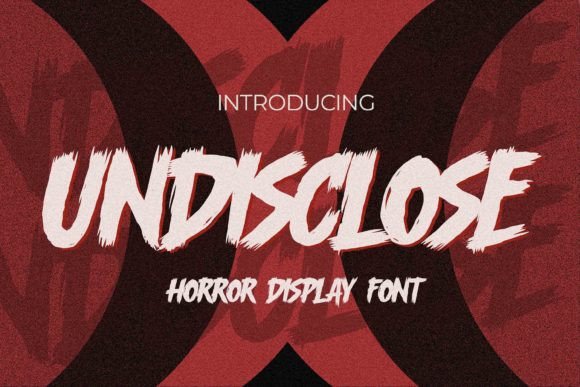
When building a digital presence, the right font can transform a simple message into a powerful visual statement. Undisclose, a horror-inspired display font, brings a textured natural style with strong, dramatic movement that makes it ideal for creative projects. As a web designer, I’ve found that fonts like Undisclose are more than just decorative—they shape user experience, guide attention, and reinforce brand tone.
Visual Characteristics of Undisclose
Undisclose stands out with its unique texture and bold, expressive strokes. It has a cool, dramatic feel that works well in high-impact scenarios. The font’s natural style gives it an organic edge, while its strong structure ensures legibility even at smaller sizes. This balance between texture and clarity is rare in display fonts and makes Undisclose versatile for various digital applications.
The character shapes have a sense of motion, which can be used to create dynamic headers or call-to-action buttons. However, this also means that careful consideration must be given to spacing and contrast when using it on websites. For example, pairing it with a clean sans-serif body font can help maintain readability without sacrificing visual interest.
Using Undisclose in Web Design Elements
In hero sections, Undisclose can be used for large headlines to immediately capture attention. Its dramatic movement helps emphasize urgency or creativity—perfect for landing pages promoting courses, products, or services. On a boutique online store, it could serve as the main title for featured collections, creating a memorable first impression.
For call-to-action areas, the font’s strong style can enhance the perceived importance of buttons such as “Shop Now” or “Get Started.” However, due to its complexity, it should be reserved for short phrases rather than long paragraphs. In a coaching website, it might appear in the header or as part of a tagline, reinforcing the brand’s bold and confident voice.
On portfolio sites, Undisclose can add a unique flair to project titles or section headings. When used sparingly, it draws the eye without overwhelming the layout. It also works well as a decorative accent in banners or image overlays, especially when paired with a neutral background.
Readability and Responsive Design Considerations
While Undisclose excels in display purposes, its readability on mobile screens requires thoughtful implementation. On small devices, ensure there is sufficient contrast between the text and background. Avoid using it for long blocks of text or in low-light environments where the texture may become distracting.
Testing different weights and styles is crucial. If the font includes variations like bold or light, these can be used strategically to improve legibility across different screen sizes. Also, consider how the font interacts with other design elements like icons, images, or animations to maintain a cohesive look.
Font Pairing and Brand Consistency
A key aspect of typography is font pairing. Undisclose pairs well with minimalist sans-serif fonts for body copy, allowing the display font to stand out without clashing. For editorial designs, a serif font might complement the natural texture of Undisclose, adding depth and sophistication.
Consistency is vital for brand identity. Using Undisclose across multiple touchpoints—such as social media graphics, email newsletters, and website headers—creates a unified visual language. This reinforces brand recognition and builds trust with users who encounter the same typographic style repeatedly.
Commercial Use and Licensing
Before implementing Undisclose on client projects or online stores, verify the font’s licensing terms. Ensure that the license covers commercial use, including websites, landing pages, digital templates, and brand assets. Some fonts require separate licenses for web embedding or multilingual support, so review the details carefully.
Choosing a premium display font like Undisclose not only elevates the aesthetic of your design but also demonstrates professionalism. It shows that you’re invested in crafting a visually compelling experience that aligns with the brand’s values and goals.
Practical Examples for Digital Projects
Imagine designing a course sales page. Undisclose could be used for the headline “Master Your Skills Today,” drawing attention and conveying energy. In a blog header, it might appear as part of a subheading, guiding readers through content sections with visual rhythm.
For a digital brand kit, include Undisclose as one of the primary typefaces, alongside complementary fonts for body text and secondary headings. This creates a layered typographic system that supports both creativity and clarity.
On an app screen or dashboard, it can be used sparingly for feature titles or alerts, ensuring that the interface remains functional while maintaining a distinct brand voice.
Ultimately, Undisclose is a powerful tool in the hands of a designer who understands typography’s role in shaping user experience. Whether used for a logo, a hero section, or a call-to-action button, it adds a layer of personality and impact that can elevate any digital project.